Run Locally
Development environment
JDK 17
Mysql 8.0.32
Redis 7.2.4
Node 20.19.4
For the basic environment, please refer to the relevant official documentation for installation.
Download the code.
You can download the code in the following two ways:
- Go to Gitee’s download page https://gitee.com/liweiyi/ChestnutCMSDownload and unzip the file into the working directory.
- Go to the GitHub download page https://github.com/liweiyi/ChestnutCMSDownload and unzip the file into the working directory.
Backend operation
We have downloaded the project code to the directory: E:/dev/workspace/ChestnutCMS. Everything is located there. {ProjectDir} It refers to this directory.
Import the IDEA project
Select the project directory in the File menu using the IDEA development tools. {ProjectDir} Then, click the “OK” button.
IDEA will automatically load Maven dependencies. The initial loading process may be slow depending on your network conditions. You can configure MAVEN’s domestic mirror repository to accelerate the download process.
Import the database (taking MySQL as an example)
Directory where the database files are located: {ProjectDir}/chestnut- admin/src/main/resources/db/migration/mysql
// Create a database
create database `chestnut_cms` charset utf8mb4;
You can initialize the database in two ways:
Initialize the database using flyway.
The project can use flyway to manage database versions. By default, this feature is disabled. {ProjectDir}/chestnut-admin/src/main/resources/application-dev.yml Setting up spring.flyway.enabled = true Enable flyway to initialize the database. After enabling flyway, you can start the application, and flyway will automatically initialize the database. Subsequent SQL statements during version updates will also be updated automatically when the application is restarted.
Manually import the database
Translate {ProjectDir}/chestnut-admin/src/main/resources/db/migration/mysql All SQL files in the directory should be imported in the order of their versions. For updates to later versions, simply import them in the same order.
Modify the configuration
Open the configuration file:{ProjectDir}/chestnut-admin/src/main/resources/application-dev.yml
Find xxl.job.enable The configuration has been changed to false. (XXL-JOB service needs to be installed.)
Find spring.data.redis.host Configure the settings to ensure that the Redis access address and port match those in the local environment. If Redis does not have an access password set, please comment it out or delete it.spring.data.redis.password Configuration: Note that changing it to an empty string is not recommended.
Find spring.datasource.dynamic.datasource.master Configure the settings to ensure that the database access address and username/password match those specified in the locally installed MySQL configuration.
Run the project
Open the file:{ProjectDir}/chestnut-admin/src/main/java/com/chestnut/ChestnutApplication.java
Right-click to select Run 'ChestnutApplication.main()' The system has been successfully launched when the console displays the information as shown in the figure below.
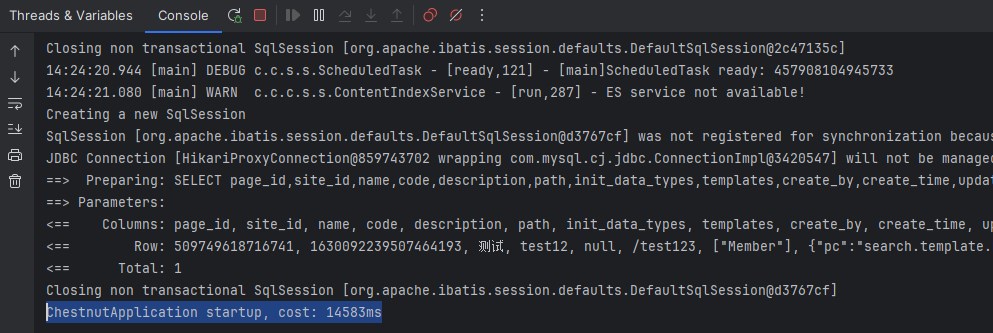
Run the front-end.
Open with VSCode {ProjectDir}/chestnut-ui Directory. Open the command line and execute the following commands:
# Enter the project directory
cd {ProjectDir}/chestnut-ui

# Install dependencies
npm install

# It is recommended not to use cnpm to install dependencies, as this may lead to various strange bugs. You can solve the problem of slow npm download by following these steps.
npm install --registry=https://registry.npmmirror.com

# Launch the service
npm run dev
Access through the browser. http://localhost:80 Default account: admin / admin
Important configurations
![Please read the important configuration details carefully!!! Click to view →]](/docs/quickstart/871044029653061.shtml)
Static resources of the website
The default path for static resources on a website is at the same level as the current project application.wwwroot_release Table of Contents. For example, if the project directory is:E:/dev/workspace/ChestnutCMS The directory for website static resources should be:E:/dev/workspace/wwwroot_release。
This path is accessible.application-xx.yml File modifications, configuration updates.chestnut.cms.resourceRoot As follows:
chestnut:
  cms:
    resourceRoot: E:/dev/workspace/wwwroot_release/
Example of website static resource directory: (Taking the demonstration site as an example, the demonstration site does not have swikoon_h5. This is just an example of the directory structure.)
# Application Directory
ChestnutCMS
|--chestnut-admin
|--chestnut-cms
|--chestnut-common
|--......
# Website static resource directory
wwwroot_rlease
|--swikoon # Dynamic site resources, typically including user uploads
|----resources # Media library for IResourceType files: images, video, audio, and other files
|------image # Image assets
|------video # Video assets
|------audio # Audio assets
|------file # Other assets
|--swikoon_pc # Desktop publishing channel. Directory format: site_directory_channel_code
|----img # Site images
|----js # Site JavaScript
|----css # Site CSS
|----template # Site template directory
|------index.template.html # Template file
|--swikoon_h5 # Mobile publishing channel. Directory format: site_directory_channel_code
|----img # Site images
|----js # Site JavaScript
|----css # Site CSS
|----template # Site template directory
|------index.template.html # Template file
Import the site theme package
The theme package has been uploaded to the QQ group.](/docs/qq)Share, file name 企业演示站主题.zip。
-
Created a new site in the backend. (Please note that theme packages cannot be imported into sites that already contain existing data.)
-
Edit site pages click
Import ThemeClick the button to upload the theme package file for download (no need to decompress it; you can import it directly!).
Common problems:
- The site preview template is not configured, or the template file does not exist.](iurl://content?id=870680061714501)
- The site preview does not include any styles.](iurl://content?id=870680061726789)
