The site preview template is not configured, or the template file does not exist.
- Confirm the configuration in the application-xxx.yml file.
chestnut.cms.resourceRootThe resources related to the site are located in the path configured. By default, they are stored in the wwwroot_release directory, which is at the same level as the project.
# Project Directory
ChestnutCMS
  chestnut-admin
  ...
# Reference for the directory structure of wwwroot_release
wwwroot_release
  swikoon # Corporate demo site resources
    resources
      image
  swikoon_pc # Desktop publishing channel for the corporate demo site
    template
      index.template.html
    js
    css
- Check the backend file management menu to ensure that the file directory matches the directory where your site resources are located.
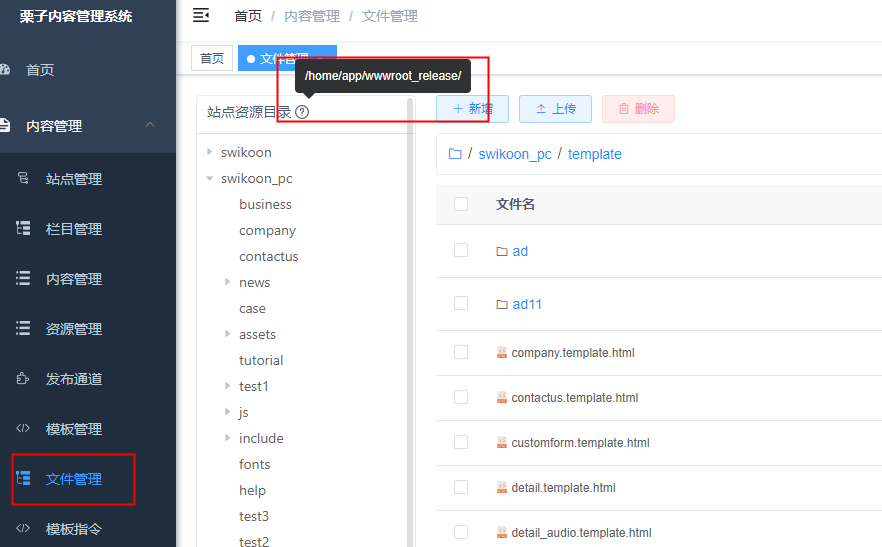
-
If it’s a dynamic template, make sure that the parameters “sid” and “pp” in the request URL are correctly set.
-
sid: Site ID
- pp: Site publishing channel encoding
If the nginx configuration includes parameters
sidandpp, use the template function.customDynamicPageLink()When obtaining the URL for the dynamic template page, the third parameter should be set to true.
